Marketing
Before and After Photos and Google Reviews for Painters
How to take before and after photos that show painting work, where to put them, and how to ask for Google reviews within Google's and the FTC's rules, with no promised results.
 PaintPilot6 min read
In this article
Take a before and after photo pair on every job, put each pair on the page that matches the job, and ask every customer for a Google review the same way, with a link, after the job. That is the whole system, and it costs about $9 a job in painter time on the example numbers in this guide. What Google and the FTC allow is narrower than most owners think: no pay or discount for a review, no asking only the happy customers, and no telling a customer what to write. This guide quotes the rules and then gives you the routine.
All dollar figures are round example numbers. The ones with a link come from Google or the FTC, pages we read on 15 November 2026; the rest are assumptions, marked as such, that you should change to yours. This guide is for the United States. We promise no number of reviews and no ranking: Google's page says there is no way to request or pay for a better local ranking on Google. Nothing here is legal advice.
How do you take before and after photos that show the work?
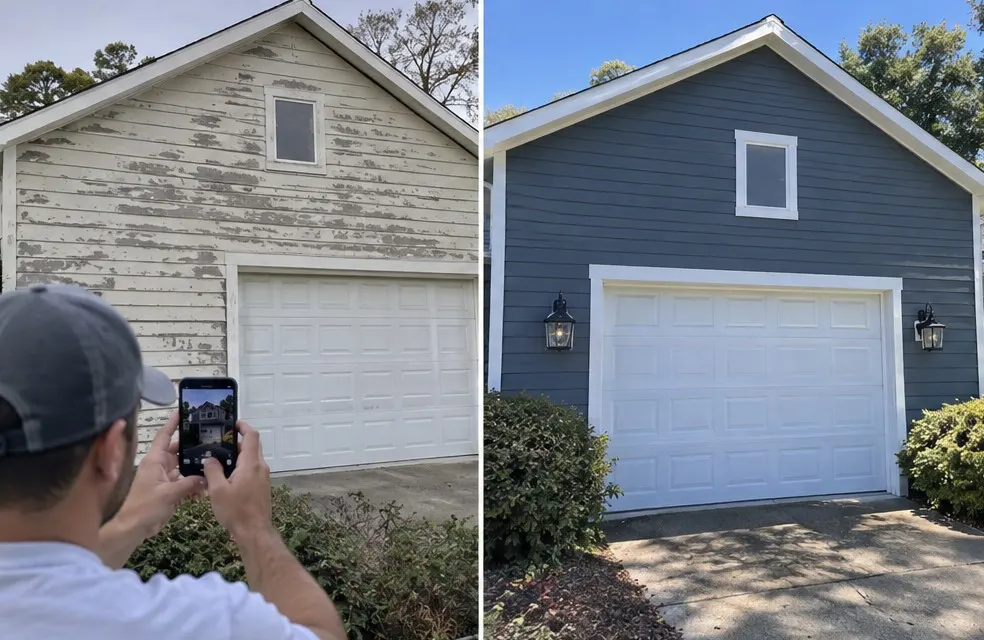
Most painters take a good "after" and forget the "before". The pair is the proof.
- Stand in the same spot for both, ideally a doorway or a corner
- Same angle, same height, phone held horizontal
- Turn on every light and open the blinds
- Clean up before the after shot: drops gone, furniture back, ladders out
- Shoot exteriors from the street at the same time of day, in soft light
- Add one close up of the detail work: a crisp cut line, a smooth cabinet door, new trim
Make it part of the job. The before is the first thing anyone does on site, and nobody packs the van until the after is taken.
What does it cost? Say ten minutes a job, which is an assumption. At $53.89 an hour of painter time from our pricing guide, that is 0.17 hour x $53.89 = $9.00. Time yours for a month.
Google's photo help page says that the photo should be in focus and well lit, and have no significant alterations or excessive use of filters. It also says that your photos and videos show up on Google only after you verify your Business Profile, and it lists the file size and resolution it accepts, so read it before you upload from a phone. Edit light and crop; do not retouch the wall.
Ask the homeowner before you post their home, and leave out house numbers, family photos and anything with a name on it.
Where do the photos go?
- On the matching service page. Cabinets on the cabinet page, exteriors on the exterior page. See the painting contractor website checklist
- On your Google Business Profile. Add them as you finish jobs, not in one batch a year later
- On the page for the town. "Recent exterior in Parkland" with the photo and one line on the job
- In your estimate. Two or three similar jobs sent with a written estimate show the customer what they are buying
What does Google allow you to do about reviews?
Three quotes from Google's own pages, because they set the limits:
- You can ask. Google's help page says that you can ask customers to visit a Google link or scan a QR code.
- You cannot pay for a review. The same page says that offering incentives, like free or discounted goods or services, in exchange for customers to post reviews, change reviews, or remove negative reviews is strictly prohibited. Google's contribution policy lists reviews or ratings that have been paid for, directly or in kind.
- You cannot ask only the happy ones. That policy lists as rating manipulation merchants who selectively solicit positive reviews from customers, and it says merchants should not require or pressure users to leave ratings or write reviews while on the premises, nor should they request that specific content be included.
The last line changes two habits common in the trade. Do not stand in the finished kitchen and push for a review, and do not tell a customer to "mention the cabinets". Send the link afterward and leave the words to them.
The FTC's rule adds to Google's. Its question and answer page says that the rule went into effect on October 21, 2024, and that it does not prohibit giving incentives for reviews, as long as there is no requirement, express or implied, that the reviews have to express a particular sentiment. Google's own policy still prohibits incentives. Where the two differ, follow the stricter one: no incentive.
How do you ask, without pushing?
Ask every customer, in the same way, after the job is finished and paid. A routine you can keep:
- At the final walkthrough, say once that you will text a link: "I will send you a link tomorrow if you want to leave a review."
- Send the Google link by text the next day, the same one for everybody. A PaintPilot site can send that request after every job, and the marketing page says so.
- If you send it yourself, a script that works: "Thanks again for letting us paint your house. If you want to leave a review, here is the link: [link]. If something is not right, call me and I will fix it first."
That last line is a separate matter, and it is allowed: fixing a problem is different from asking someone to hide it. It is not allowed to offer a refund or a discount in return for removing a review.
A QR code on your invoice works too. Google's page on review links suggests you include it on your receipts and in thank you emails, and says that review QR codes can only be generated on a computer browser, not on mobile devices.
Whether an automated review text needs the customer's consent depends on how and what you send. The federal rule on automated calls is quoted in the missed calls guide: read that section, and ask a lawyer or your provider, before you automate it.
How should you answer reviews?
Answer all of them, the good ones too. Google's page says that customers value direct and honest responses, and it tells you not to use a reply to advertise deals. Keep it short and specific: "Thanks, Mark. The two tone in the family room came out well. Enjoy it."
For a bad review: reply promptly, calmly, and say what you did or will do. The same Google page says: "Never share a reviewer's private information or engage in personal attacks." If the case is complex, ask the reviewer to contact you by phone or email. Future customers read your reply as much as the complaint.
What not to do
- Do not buy reviews or post fake ones: Google lists reviews that have been paid for as a violation
- Do not offer a discount for a review: strictly prohibited by Google
- Do not ask only the customers you think are happy
- Do not ask customers to put specific words in a review
What should you count?
You cannot control how many reviews you get. You can count what you do. Each month, write down: jobs finished, photo pairs taken, review requests sent, reviews received. If requests are not going out after every job, that is the number to fix. The reviews are what the customers decide. For the rest of your Google presence, read how to get painting customers, and see painting estimates without driving out for what to send with an estimate.
Frequently asked questions
How many Google reviews does a painting company need?
There is no number we can source. Google's help page says more reviews and positive ratings can help your business's local ranking, and that there is no way to request or pay for a better local ranking. Ask every customer in the same way and count the requests you send.
Can I give a discount for a Google review?
No. Google's help page says that offering incentives, like free or discounted goods or services, in exchange for customers to post reviews is strictly prohibited.
Can I ask only my happy customers for a review?
No. Google's contribution policy lists selectively soliciting positive reviews from customers as rating manipulation. Ask every customer, the same way, and do not tell them what to write.